

A Modbus point is just a number in a register until somebody writes down what that number means. The register map is that writing — and getting it wrong is one of the oldest ways to produce a monitoring system that displays plausible but incorrect engineering values.
This guide covers making register maps usable in BAaaS, Hexomation’s managed gateway platform: the connection prerequisites, the addressing model behind recurring commissioning errors, what the CSV import actually checks, and how to prove a mapped value against something you trust. It’s a commissioning piece, not a protocol tutorial — and every example here is invented.
Where BAaaS fits
BAaaS is Hexomation’s managed gateway platform for building automation: a gateway you install on the site picks up a device identity tied to that site, then speaks the field protocols integrators actually carry — BACnet/IP and MS/TP via supported routers, Modbus, LonWorks over IP-852, and MQTT. On the trust side the same gateway can act as a BACnet/SC node or as a site’s primary-only edge hub; there is no managed cloud hub in this product — that’s the separate HUBaaS offering, and the two products live on separate tenants.
On top of the field path sits the operational layer: monitoring selection, equipment groups, trends, alarms, schedules, notifications, dashboards and analytics, plus governance through MFA, roles and audit logging, an AI assistant, and an Android field app. Feature availability varies by plan, version, and hardware entitlement — and monitoring itself is a separate workflow owned by its own article; this one is about getting the map right before monitoring matters.
Get the connection prerequisites right first
Modbus TCP is the easier path: the gateway needs outbound reachability to the device’s configured port — commonly 502 — on the right network segment. Modbus RTU is a different story: it requires a supported local serial path plus matching framing and wiring. That is not the BACnet MS/TP router model — do not assume a BACnet serial-path setup carries over, and do not assume the register-map CSV transports RTU settings; those are established in the supported RTU workflow.
Confirm the transport before touching the map. A perfect CSV against an unreachable TCP endpoint, or a correct register map on a serial trunk that isn’t wired to the gateway’s supported path, produces the same empty result — and the map isn’t the problem. The simplest diagnostic is reachability first, mapping second — in that order, not the reverse.
Manufacturer references are not addresses
The most common Modbus confusion: the number in the vendor’s document is a reference, not necessarily the address on the wire. Modbus addresses are zero-based within each register-type space. A human reference like “30001” maps to input-register address 0 only when the manufacturer uses that reference-number convention — do not blindly subtract 30001 (or 40001) from every vendor’s address field.
Check the vendor’s own documentation for their convention before writing the CSV. Two meters can label the same physical register “30001” and “0” interchangeably, and a third can number addresses directly — the wrong assumption puts your data one register off, which reads as plausible-but-wrong values, the worst kind of bug. Resolve an ambiguous address convention using the manufacturer documentation or an approved vendor diagnostic workflow; do not probe undocumented locations on a production device to guess the map.
Types, width, signedness, byte order
Modbus exposes four register spaces — coils and discrete inputs (single bits) and input and holding registers (16-bit words). The CSV’s register-type column selects the space; input and discrete-input targets are readable, not writable — protocol rules, not a product limitation. A holding register being protocol-writable still doesn’t make every vendor location safe to write; this article teaches mapping and reads, not writes.
Where the real commissioning work lives is the interpretation layer: a value wider than one word needs multi-register assembly, signed values need the right signedness, and multi-word values need the right byte and word order. Treat all of these as requirements you must prove on the target release and device, not features to assume. The reviewed read path returns one word per holding or input register — no automatic scaling, assembled multi-word value, or arbitrary byte-order decode is demonstrated there — so the import’s acceptance of a declared type is not evidence of decode behavior.
That’s why this article’s example deliberately stays on single-word uint16 with scale 1: it’s the interpretation you can verify end-to-end without depending on any decoding claim. If your device genuinely requires 32-bit floats or signed multi-word values, prove that path on your release before you build monitoring on it — the map schema accepting a type label is not evidence the decode lands correctly.
The register-map CSV, exactly
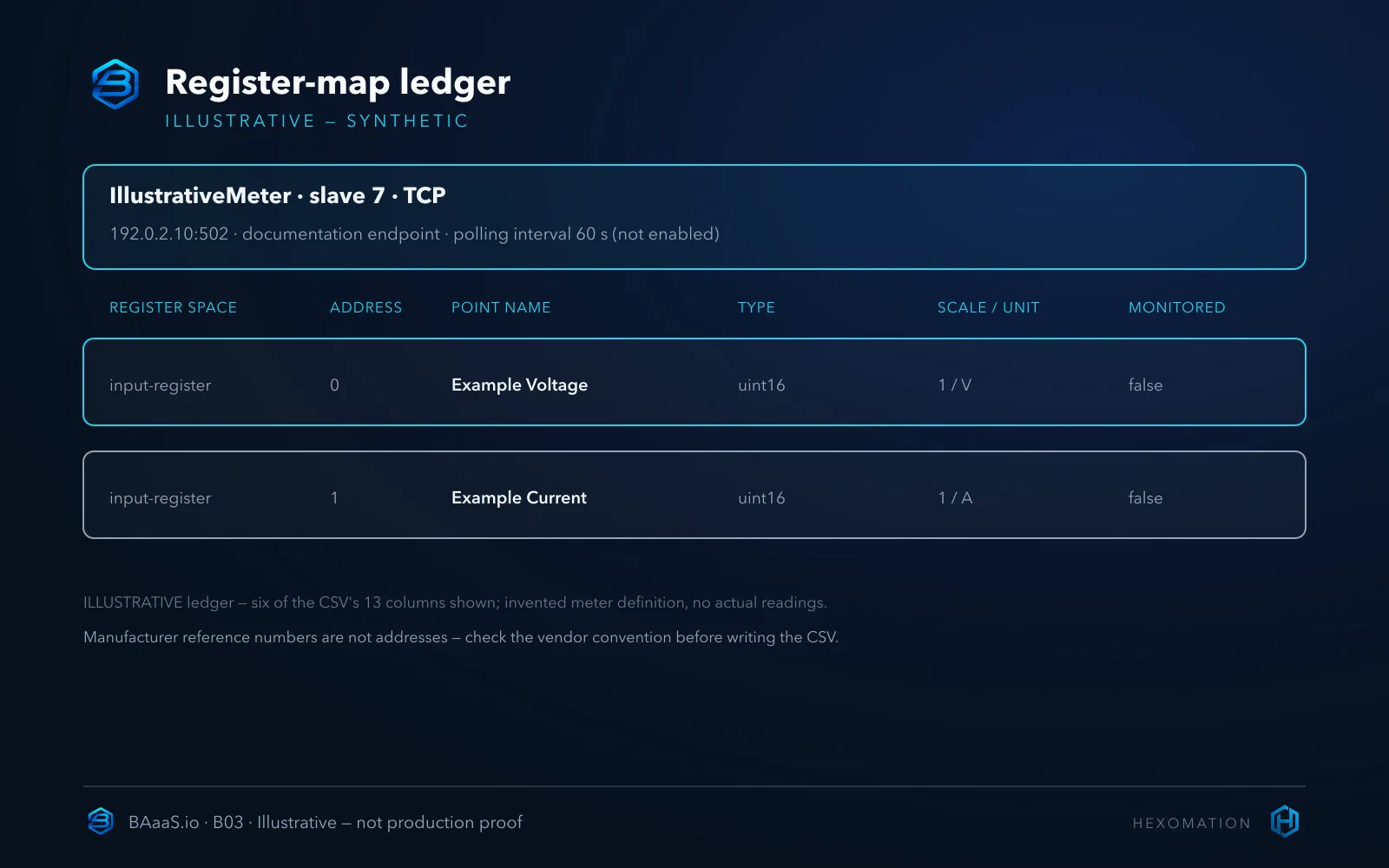
The import uses a fixed 13-column header — reproduce it exactly, since the importer’s schema is strict about labels and a simple comma splitter that does not support quoted embedded commas. Keep field values plain (no commas inside cells), start from a fresh template from the target release rather than reusing an old file, and keep monitoring flags explicit.
deviceName,slaveId,connectionType,endpoint,port,registerType,address,registerName,dataType,scaleFactor,unit,isMonitored,pollingIntervalSeconds
IllustrativeMeter,7,TCP,192.0.2.10,502,input-register,0,Example Voltage,uint16,1,V,false,60
IllustrativeMeter,7,TCP,192.0.2.10,502,input-register,1,Example Current,uint16,1,A,false,60
Every field above is invented for documentation: 192.0.2.10 is a documentation-only address, not a deployed endpoint; “IllustrativeMeter” is not a vendor; and isMonitored is deliberately false — a map import is not a monitoring decision. These rows do not request new monitoring; the flag alone is not proof that an existing monitoring session has stopped. There is no CSV column for byte order, word order, address offset, or serial configuration — do not invent one; those concerns belong to their own workflows.
Validate, import, verify — three different things
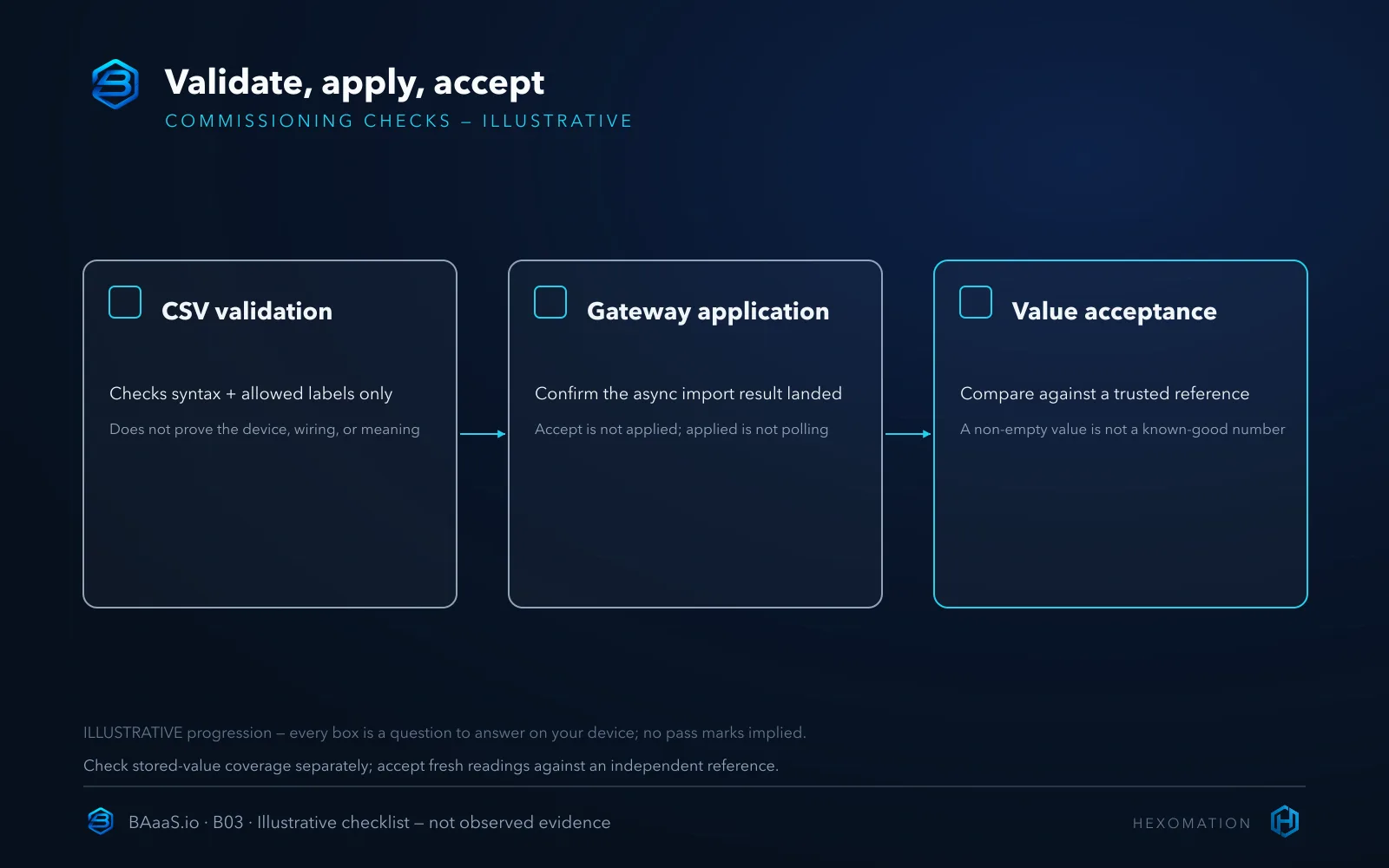
The console separates three steps that are easy to conflate. Validate is a syntax-and-schema check: it confirms the file parses and the labels are allowed, then stops — no records are saved and nothing is pushed to a gateway. It does not check whether your meter actually exists, whether the wiring is right, whether addresses match the vendor’s convention, or whether the values will be correct.
Import saves the map as cloud records and sends an asynchronous command to the gateway. The “import succeeded” response means the records were accepted — not that the gateway has applied them, that polling started, or that any device answered. And a re-import can update existing definitions, so treat it as a configuration change, not a harmless file upload. Confirm the asynchronous result actually landed before assuming the map is live.
Verify counts configured registers with a non-empty stored present value. It is a coverage indicator, not a fresh device test: a stored value may be stale or incorrectly interpreted. New rows imported with isMonitored=false may legitimately have no value yet. Obtaining a fresh platform reading requires a separately authorized read or controlled monitoring trial; this example does not start one. Template/verify and import also require different permissions.
Accept the value against a trusted reference
The only step that proves meaning is a comparison against something you already trust. With the invented example, a raw word of 230 at input-register address 0 and 12 at address 1 would represent 230 V and 12 A only under this invented meter definition — no actual reading was taken, and nothing here demonstrates those values. On a real integration, the acceptance check is: read the device’s own display or a calibrated reference instrument, and confirm the mapped value matches.
Do that comparison on at least one register of each type and unit family in the map before calling the import done — a map that nails the voltage row can still have the current row shifted by a bad address assumption, and the only check that catches it is another independent reading.
If the reference and the platform disagree, trace the documented address convention, register space, raw value, scaling behavior and collection timestamp before accepting the point. A correct map cannot compensate for stale data, an unsupported conversion or a faulty reference instrument. Keep the point out of operational decisions until the discrepancy is understood.
Limits and the honest alternative
The import is a mapping workflow, not a decoder: it stores declared types, scales and units, and it does not promise auto-detection of register semantics, arbitrary multi-word assembly, or byte-order options on the reviewed polling path. If a device genuinely needs proprietary framing or semantics, a specialized driver or vendor tool may be the better fit — that’s a real tradeoff to weigh, not a gap to hide.
The practical advantage is continuity: a map that lands in the platform becomes part of the same console where monitoring, alarms and operations live — reused, not re-entered from a standalone utility each commissioning visit. That payoff only arrives after the value is proven, though — the checklist figure is deliberately empty, because “accepted by the importer” and “correct on the plant” are different facts.
Map it, then prove it
The sequence that holds up on real sites: confirm the transport, check the vendor’s addressing convention, write the CSV from a fresh template and keep the explicit false monitoring flags, validate, import, and confirm the asynchronous result; then plan a separately authorized fresh read or controlled monitoring trial and compare the value against a trusted reference. Treat Verify as a coverage indicator, not a correctness gate — false flags do not make values appear on their own. The first two articles in this series covered getting a gateway trusted and building the BACnet inventory; this is the same discipline applied to Modbus — the inventory walkthrough carries the matching boundaries for that protocol.
To evaluate register mapping on your own sites, review the capability overview at BAaaS.io/features. Follow-on guides cover monitoring selection and write authorization in more depth.